

子比主题VIP免费下载的文章,VIP会员是可以直接看到下载地址,但想让网站的会员活跃起来,就不能又设置会员下载又设置回复下载!
下面就贴出俩段代码,解决VIP免费文章需要回复后才能下载!
一个是全局设置,一个指定文章设置,不需要修改主题代码,直接扔进 functions.php 文件中即可
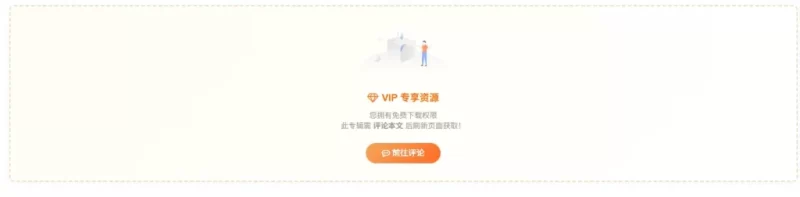
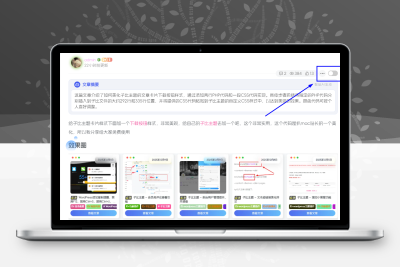
先看效果(这是添加代码后的效果,如果是普通账号或者未登录账号就正常显示)
![图片[1]-子比主题VIP免费资源必须评论后才能查看下载链接的代码分享-比子网络](https://oss.bllzi.com/uploads/2026/01/20260115084350684-93f0c18d2cbcb8be1fe9ac35f8f2ad05-1024x252.webp)
方案一:全局生效版(所有VIP免费文章都强制回复)
/**
 * 【全局版】子比主题定制:VIP免费资源强制评论后才能下载
 */
add_filter('zibpay_posts_paid_box', 'zibll_vip_free_global_must_comment', 10, 3);

function zibll_vip_free_global_must_comment($html, $pay_mate, $post_id) {
    // 1. 获取当前用户
    $user_id = get_current_user_id();
    if (!$user_id) return $html;

    // 2. 获取权限状态
    $paid = zibpay_is_paid($post_id, $user_id);

    // 3. 核心判断:必须是 VIP且免费 类型 (排除单独购买的用户)
    if ($paid && isset($paid['paid_type']) && strpos($paid['paid_type'], 'vip') !== false && strpos($paid['paid_type'], 'free') !== false) {

        // 4. 检查是否已评论 (状态为 approve)
        $args = array(
            'user_id' => $user_id,
            'post_id' => $post_id,
            'count'   => true,
            'status'  => 'approve'
        );
        $comment_count = get_comments($args);

        // 5. 拦截:未评论则显示美化后的提示框
        if ($comment_count == 0) {
            $icon_url = ZIB_TEMPLATE_DIRECTORY_URI . '/img/null-2.svg'; // 修复:使用存在的图片

            // 美化样式:VIP淡金背景 + 虚线边框
            $box_style = 'background: linear-gradient(135deg, #fffdf5 0%, #fff 100%); border: 2px dashed #e8dcb6; border-radius: 8px;';

            $new_html = '<div class="zib-widget pay-box" id="posts-pay" style="'.$box_style.'">';
            $new_html .= '<div class="text-center padding-20 box-body">';

            // 图片
            $new_html .= '<div class="mb20"><img style="width:160px; opacity:0.8;" src="' . $icon_url . '"></div>';

            // 标题和文案
            $new_html .= '<div class="em12 mb10 c-yellow font-bold"><i class="fa fa-diamond mr6"></i>VIP 专享资源</div>';
            $new_html .= '<div class="muted-2-color mb20" style="font-size:13px;">您拥有免费下载权限<br>为了社区活跃,请 <b>评论本文</b> 后刷新页面获取!</div>';

            // 按钮
            $new_html .= '<a href="#respond" onclick="if(document.getElementById(\'respond\')){document.getElementById(\'respond\').scrollIntoView({behavior:\'smooth\'});return false;}else{window.location.href=\'#respond\';}" class="but jb-yellow padding-lg radius"><i class="fa fa-commenting-o mr6"></i>前往评论</a>';

            $new_html .= '</div></div>';

            return $new_html;
        }
    }

    return $html;
}
方案二:特定文章版(仅指定 ID 的文章生效)
/**
 * 【指定文章版】子比主题定制:指定文章VIP免费强制评论
 */
add_filter('zibpay_posts_paid_box', 'zibll_vip_free_specific_must_comment', 10, 3);

function zibll_vip_free_specific_must_comment($html, $pay_mate, $post_id) {
    // =======================================================
    // 🟢 配置区域:在这里填写文章ID,逗号隔开
    // =======================================================
    $target_ids = array(1234, 5678, 8888);

    // 1. 如果不是指定文章,直接忽略
    if (!in_array($post_id, $target_ids)) {
        return $html;
    }

    // 2. 获取当前用户
    $user_id = get_current_user_id();
    if (!$user_id) return $html;

    // 3. 获取权限状态
    $paid = zibpay_is_paid($post_id, $user_id);

    // 4. 核心判断:必须是 VIP且免费 类型
    if ($paid && isset($paid['paid_type']) && strpos($paid['paid_type'], 'vip') !== false && strpos($paid['paid_type'], 'free') !== false) {

        // 5. 检查是否已评论
        $args = array(
            'user_id' => $user_id,
            'post_id' => $post_id,
            'count'   => true,
            'status'  => 'approve'
        );
        $comment_count = get_comments($args);

        // 6. 拦截:未评论则显示美化后的提示框
        if ($comment_count == 0) {
            $icon_url = ZIB_TEMPLATE_DIRECTORY_URI . '/img/null-2.svg'; // 修复图片路径

            // 美化样式:VIP淡金背景 + 虚线边框
            $box_style = 'background: linear-gradient(135deg, #fffdf5 0%, #fff 100%); border: 2px dashed #e8dcb6; border-radius: 8px;';

            $new_html = '<div class="zib-widget pay-box" id="posts-pay" style="'.$box_style.'">';
            $new_html .= '<div class="text-center padding-20 box-body">';

            // 图片
            $new_html .= '<div class="mb20"><img style="width:160px; opacity:0.8;" src="' . $icon_url . '"></div>';

            // 标题和文案
            $new_html .= '<div class="em12 mb10 c-yellow font-bold"><i class="fa fa-diamond mr6"></i>VIP 专享资源</div>';
            $new_html .= '<div class="muted-2-color mb20" style="font-size:13px;">您拥有免费下载权限<br>为了社区活跃,请 <b>评论本文</b> 后刷新页面获取!</div>';

            // 按钮
            $new_html .= '<a href="#respond" onclick="if(document.getElementById(\'respond\')){document.getElementById(\'respond\').scrollIntoView({behavior:\'smooth\'});return false;}else{window.location.href=\'#respond\';}" class="but jb-yellow padding-lg radius"><i class="fa fa-commenting-o mr6"></i>前往评论</a>';

            $new_html .= '</div></div>';

            return $new_html;
        }
    }

    return $html;
}© 版权声明
本站收集的资源仅供内部学习研究软件设计思想和原理使用,学习研究后请自觉删除,请勿传播,因未及时删除所造成的任何后果责任自负。
如果用于其他用途,请购买正版支持作者,谢谢!若您认为本站发布的内容若侵犯到您的权益,请联系站长邮箱:596993347@qq.com 进行删除处理。
本站资源大多存储在云盘,如发现链接失效,请联系我们,我们会第一时间更新。THE END













暂无评论内容